多模式聊天
框架将 文字聊天 拆成多个 独立房间名(Room),同一套客户端消息(如 chat),由 进房时的 options 决定频道:世界、工会、附近、队伍等。与 匹配房 matchmaker_room、对局房 game_room 不同类房间;完整消息名清单仍见 消息协议。
浏览器演示(ChatDemo)
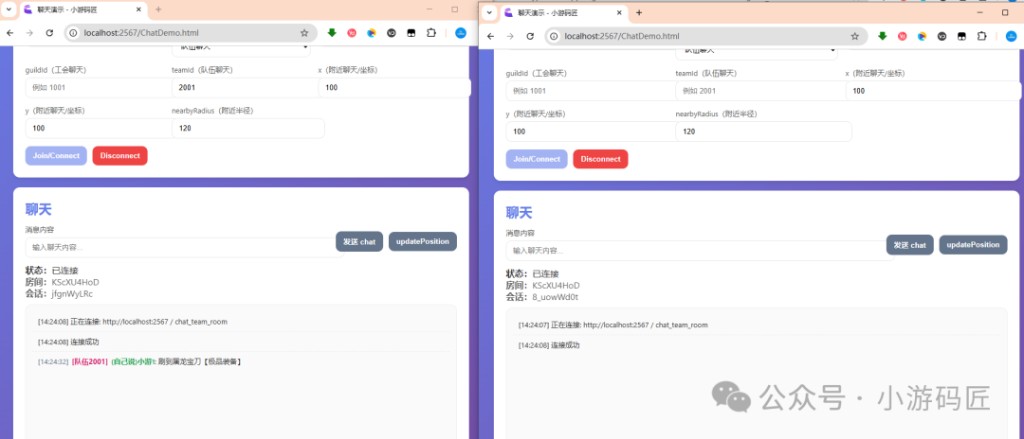
服务端仓库静态页 ChatDemo.html(浏览器标题「聊天演示 - 小游码匠」)用于联调 工会 / 队伍 / 附近 等进房参数与 chat / updatePosition:
| 项 | 说明 |
|---|---|
| 路径 | 源码 src/public/ChatDemo.html,构建后在 dist/public/ |
| 打开 | http://localhost:<PORT>/ChatDemo.html,默认端口 2567(PORT 环境变量) |
| 说明 | 页内填写 JWT 后连接;guildId、teamId、x / y、nearbyRadius 与进 chat_*_room 的 options 对应;可 发送 chat、updatePosition 验证附近频道。 |
多开窗口、使用 不同 teamId / guildId 或坐标,可对照下面四种房间,观察消息是否只出现在预期频道。完整跑通服务与拿 Token 见 快速入门。
四种聊天房
| 房间名 | 典型用途 | 关键 options(与鉴权) |
|---|---|---|
chat_world_room | 全服世界频道 | JWT;可选业务字段。支持 Redis Pub/Sub 在多 Colyseus 进程间同步同一条世界消息。 |
chat_guild_room | 工会 / 公会内频道 | JWT + guildId,仅同公会成员会话内互通。 |
chat_nearby_room | 地图附近可见聊天 | JWT + 坐标(如 x / y)及 nearbyRadius 等(与实现一致);需 updatePosition 更新位置。 |
chat_team_room | 小队 / 固定队伍频道 | JWT + teamId;常与 Party 房间码组局共用同一 teamId(如直接取 partyId)。 |
房间注册与类名对应关系见 项目结构。进房鉴权(token / accessToken)见 鉴权与权限、JWT 与房间鉴权。
进房示例
(客户端代码) 分两段:① 四种 joinOrCreate 与 options(与 ChatDemo.html 一致);② 进房后注册 onMessage("chat")、send("chat", …),附近房再发 updatePosition。Cocos / Unity / Godot 细节见各 引擎接入 页。
约定:token 与 accessToken 二选一即可(与 JWT 与房间鉴权 一致)。teamId 常与 Party / 匹配下发的 partyId、joinOptions 对齐,见 组队下副本。
① 进房 options(四种房间名)
import Colyseus from "colyseus.js";

const client = new Colyseus.Client("ws://127.0.0.1:2567");
const accessToken = "<JWT>"; // HTTP 登录拿到的 accessToken,进房字段名用 token
/** Party / match:found 等载荷里的队伍或房间码,与全队进 chat_team_room 对齐 */
const partyIdFromPartyPayload = "PARTY_AB12";

// 世界
await client.joinOrCreate("chat_world_room", { token: accessToken });

// 工会:必须带 guildId
await client.joinOrCreate("chat_guild_room", {
  token: accessToken,
  guildId: "1001",
});

// 附近:进房时带初始坐标与半径(字段名以服务端 Room 为准;ChatDemo 与下节一致)
await client.joinOrCreate("chat_nearby_room", {
  token: accessToken,
  x: 120,
  y: 45,
  nearbyRadius: 80,
});

// 队伍:全队同一 teamId 即同一聊天会话
await client.joinOrCreate("chat_team_room", {
  token: accessToken,
  teamId: partyIdFromPartyPayload,
});using System.Collections.Generic;
using Colyseus.Schema;
// 假设已有 Colyseus.Client client、string accessToken、string partyIdFromPartyPayload
var world = await client.JoinOrCreate<DynamicSchema>(
"chat_world_room",
new Dictionary<string, object> { { "token", accessToken } }
);
var guild = await client.JoinOrCreate<DynamicSchema>(
"chat_guild_room",
new Dictionary<string, object> {
{ "token", accessToken },
{ "guildId", "1001" },
}
);
var nearby = await client.JoinOrCreate<DynamicSchema>(
"chat_nearby_room",
new Dictionary<string, object> {
{ "token", accessToken },
{ "x", 120 },
{ "y", 45 },
{ "nearbyRadius", 80 },
}
);
var team = await client.JoinOrCreate<DynamicSchema>(
"chat_team_room",
new Dictionary<string, object> {
{ "token", accessToken },
{ "teamId", partyIdFromPartyPayload },
}
);# 假设已有 Colyseus.Client client、access_token、party_id_from_party_payload(字符串)
# 世界
var _world = client.join_or_create("chat_world_room", {"token": access_token})
# 工会
var _guild = client.join_or_create("chat_guild_room", {
"token": access_token,
"guildId": "1001",
})
# 附近
var _nearby = client.join_or_create("chat_nearby_room", {
"token": access_token,
"x": 120,
"y": 45,
"nearbyRadius": 80,
})
# 队伍
var _team = client.join_or_create("chat_team_room", {
"token": access_token,
"teamId": party_id_from_party_payload,
})② 进房后:监听下行 chat、上行发送(含附近 updatePosition)
仓库 ChatDemo.html 中上行 chat 使用 { message: string }(不是裸字符串);updatePosition 为 { x, y }。下列以世界房为例写完整闭环;工会 / 队伍 / 附近仅 进房 options 不同,收发消息名相同。
import Colyseus from "colyseus.js";

async function worldChatDemo() {
  const client = new Colyseus.Client("ws://127.0.0.1:2567");
  const room = await client.joinOrCreate("chat_world_room", { token: "<JWT>" });

  room.onMessage("chat", (payload: Record<string, unknown>) => {
    // 下行结构见下文「下行 chat 广播」与消息协议
    console.log("chat", payload);
  });

  room.onError((code, message) => console.error("room error", code, message));

  // 上行:与 ChatDemo 一致
  room.send("chat", { message: "hello world" });

  // 仅 chat_nearby_room:移动后周期性上报坐标,供服务端筛选听众
  // room.send("updatePosition", { x: 120, y: 46 });
}

worldChatDemo().catch(console.error);using System;
using System.Collections.Generic;
using Colyseus;
using Colyseus.Schema;
using UnityEngine;
public static async void WorldChatDemo(Colyseus.Client client, string accessToken)
{
var room = await client.JoinOrCreate<DynamicSchema>(
"chat_world_room",
new Dictionary<string, object> { { "token", accessToken } }
);
room.OnMessage<Dictionary<string, object>>("chat", payload =>
{
payload.TryGetValue("message", out var msg);
Debug.Log($"chat message={msg}");
});
room.Send("chat", new Dictionary<string, object> { { "message", "hello world" } });
// 附近房:room.Send("updatePosition", new Dictionary<string, object> { { "x", 120 }, { "y", 46 } });
}# 进房后(官方 GDExtension:joined / message_received;与 ChatDemo 负载一致)
func run_world_chat_demo(client: Colyseus.Client, access_token: String) -> void:
var room := client.join_or_create("chat_world_room", {"token": access_token})
if not room:
return
room.joined.connect(func():
room.message_received.connect(_on_chat_message)
room.send_message("chat", {"message": "hello world"})
# 附近房:room.send_message("updatePosition", {"x": 120, "y": 46})
)
func _on_chat_message(type: Variant, data: Variant) -> void:
if str(type) == "chat":
print("chat ", data)客户端发送的消息
| 消息名 | 方向 | 说明 |
|---|---|---|
chat | 客户端 → 服务端 | 发送聊天正文。仓库 ChatDemo.html 使用 { message: string };若您 fork 了服务端,以当前 Room 实现为准。 |
updatePosition | 客户端 → 服务端 | 仅附近频道 有意义:负载 { x, y }(与进房初始坐标同一套字段),移动后应节流或定时上报,供服务端筛选听众。 |
监听下行仍用 room.onMessage("chat", handler);其余房间类型专用消息(如匹配、帧同步)不在本节展开,见 匹配与开房、帧同步与游戏房。
下行 chat 广播(示例)
其它在线成员会收到结构类似于(字段以仓库为准):
(客户端代码)
{
  channel: "guild", // 或 world / nearby / team 等标识
  message: "hello",
  sender: {
    sessionId: "xxx",
    userId: "u001",
    username: "playerA"
  },
  timestamp: 1710000000000
}
更完整的示例与频道枚举见 消息协议 中的 chat 下行消息示例 与 频道说明。
世界频道与多实例
世界频道消息量大、且玩家可能落在 不同 Colyseus 进程。服务端对世界频道使用 Redis 做跨实例广播,因此部署多进程 / 多机时请保证 Redis 可用(环境变量见 配置说明)。工会 / 队伍等频道多以「单房内广播」为主,仍依赖正确传入 guildId / teamId 以隔离会话。
与 Party、副本流程的组合
被动开房、等人阶段全队进 chat_team_room、房主再 party:start 进入 game_room 的完整串联示例见:组队下副本(Party + 队伍聊天)。
通用收发约定
任意 Colyseus 房间仍遵循:
- 上行:
room.send("eventName", payload) - 下行:
room.onMessage("eventName", handler)
建议为每条消息维护 入参 / 出参 / 错误码 说明;高频消息在客户端做 节流或合并,避免压满带宽与序列化开销。